DHCP
Introduction
This post aims to teach fundementals of the DHCP protocol.
What is DHCP?
DHCP stands for Dynamic Host Configuration Protocol, which is a network protocol that automatically assign IP addresses and configuration settings for a device when it’s connected to the network.
Why Need DHCP?
Without DHCP joining a network requires to manually configuring the IP address and its configurations for each device.
Imagine in an office environment with thousanda of computers, the IT guy have to assign IP address for the each computer, and the worst part is if he accidently put same IP address for multiple devices cause conflicting and those devices won’t work.
DHCP solves this with automatically assigning IP addresses.
How It Works
DHCP uses client and server architecture. Client conects to a network and requests for an IP address, and the DHCP server(s) lease the IP address to the client.
All common Operating Systems comes with both DHCP server and client applications installed. DHCP server as well? Yes! Think when you open hotspot Wi-Fi from your device, it behave as the DHCP server.
UDP, ports and TXID
DORA Process
The DORA Process is the four steps communication process for DHCP server to assign IP to the client. The four steps; Discover, Offer, Request and Ack.
1. DHCP_DISCOVER
On a network there can be multiple DHCP servers for load balancing and failover. So firstly, the client broadcasts a DHCP Discover Message in order to find the DHCP servers.
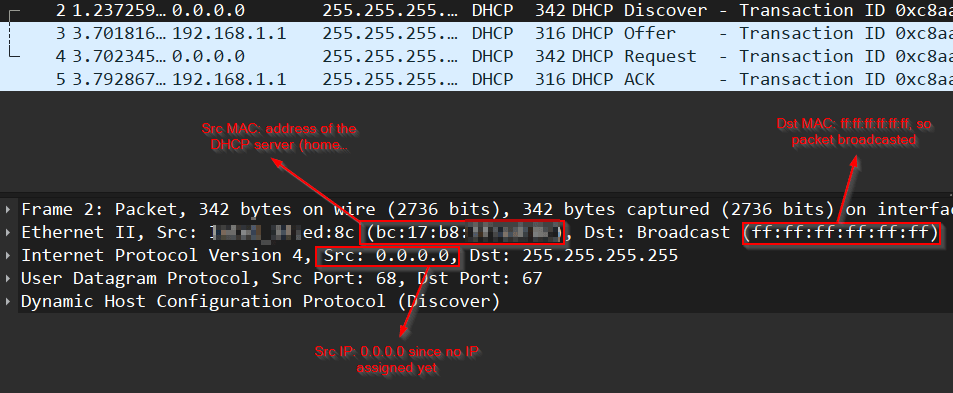
Source IP address is 0.0.0.0. That make sense because we don’t have an IP address yet!
Source MAC is the clien’t MAC address, and the destination MAC address is set as FF:FF:FF:FF:FF:FF means broadcasting the package in the network.
During DHCP Discover, client can asks for a specific IP address with Option (50). This amost always happen because the client wants to claim the same IP address that it used before.
- If requested IP is available, server will reply with DHCP Offer.
- If requested IP is already leased, server ignores the Option 50 and offers a different, avialable IP from its pool.
- If requested IP belongs to a different subnet, server simply ignores the request, and offers a valid IP
2. DHCP_OFFER
DHCP Server receives the discover messages and replays with a DHCP offer request. An offer includes an IP address and configuration settings.
Offer message can be either unicast or broadcast. It’s decided by the discover message with Bootp flags: 0x0000 (Unicast).
3. DHCP_REQUEST
DHCP clients choose from received offers, and send a DHCP_REQUEST message to the server. This message tells the server its offer is accepted by the client, and now server should do the necassery lease work.
4. DHCP_ACK
The DHCP server sends Acknowledge Message in order to finalize the DORA process and tell “Everything is fine, I did the necassery work so let’s finalize this operation!”.
However, If the DHCP server explicityl rejects a clien’t DHCP_REQUEST the server will send DHCP_NAK message. Details of the NAK message is important for us, so we will talk about it in the below.
5. Post-Allocation
After the DORA process configurations do not applied blindly. There is a post-allocation phase where the client must verify the address and establish its lifecycle.
- Arp Probing
- DDNS
- Lease Timers
DHCP Lease
As we mentioned DHCP server do not set an IP address for a client it lease the IP address. So when a device no longer part of the network, the assigned IP address will be cleared from the DHCP server’s pool and open space for new devices.
There are three important timing for the lease duration; we will refer those T, T1 and T2.
Lease Time (T): This is the maximum duration for a IP address before the renewal.
Renewal Time (T1 - T/2): By default it’s assigned as the half of the duration of the lease time (T). Once the T1 expires, client will send a unicast renewal message to the DHCP server which before assigned the IP address for the client - original server.
Rebinding Time(T2 - 7T/8): By default it’s configured as %87.5 of the lease time (T). When client can not reach to the original DHCP server, it starts to ask for an IP to all DHCP servers in the network with broadcast messages.