How Unreal Engine's Lyra Handles Game Events
Unreal Engine’s Game Message System
Unreal Engine has one of the most elegant architecture designs I seen. Probably I will look more inside Unreal Engine and write about it in the future. In this post, we will turn our microscopes towards to Unreal Engine Lyra’s Game Message System. It’s more advanced way of game events or observer pattern. However, rather than trying to understand how it works, this writing will try to understand how the developers came up with this design. I believe such understanding is more important than the system itself.
What is the Lyra Starter Game
Lyra is Epic’s reference gameplay project that demonstrates modern best practices for Unreal Engine development. It’s a multiplayer third-person shooter that includes well-architected systems such as GAS and the Gameplay Message Subsystem. Studying Lyra is useful because it shows how to structure a real game project for robustness and reusability.
What is an Event System and Why We Need
Briefly Why We Need Event System
Imagine two systems: Player and RespawnManager. In a naive approach the Player directly calls the respawn logic when its health drops to zero:
1
2
3
4
5
6
7
8
9
10
11
12
13
14
15
16
void Player::OnHealthChanged(AActor* InstigatorActor, UHarvestAttributeComponent* OwningComp,
                                        float NewHealth,
                                        float Delta)
{
	// When a player die
	if (NewHealth <= 0 && HasAuthority())
	{
		AHarvestGameMode* SurvivalGameMode = GetWorld()->GetAuthGameMode<AHarvestGameMode>();

		if (SurvivalGameMode)
		{
            // Here is SurvivalGameMode is the Respawn Manager
			SurvivalGameMode->KillPlayer(InstigatorActor, this)
		}
	}
}
This works, but it’s tightly coupled: the Player needs to know about the GameMode. If you swap to a different game mode (e.g., ArenaGameMode) you must change the Player code.
By the way, this is an real life scenario that I faced when I was working on my survival game project Tarnish, so if you love competitive games and the survival genree give it some love!
With a message/event system the Player simply broadcasts a Game.Player.Die event and any system that listens can react.
1
2
3
4
5
6
7
8
9
10
11
12
13
14
15
16
17
18
void Player::OnHealthChanged(AActor* InstigatorActor, UHarvestAttributeComponent* OwningComp,
                                        float NewHealth,
                                        float Delta)
{
    // Broadcast player death
    if (NewHealth <= 0 && HasAuthority())
    {
        AController* CharacterController = GetController();
        if (CharacterController)
        {
            FHarvestMessageVerb Message(FGameplayTag::RequestGameplayTag(FName("Game.Player.Die")), InstigatorActor, this);

            UGameplayMessageSubsystem& MessageSystem = UGameplayMessageSubsystem::Get(GetWorld());

            MessageSystem.BroadcastMessage(Message.Verb, Message);
        }
    }
}
Now the Player only handles its own state and the respawn logic is handled by whoever listens to the Game.Player.Die event.
Building an Event System from Scratch
We’ll start with a classic Observer example (Unity/C#) and use it to highlight common problems and improvements.
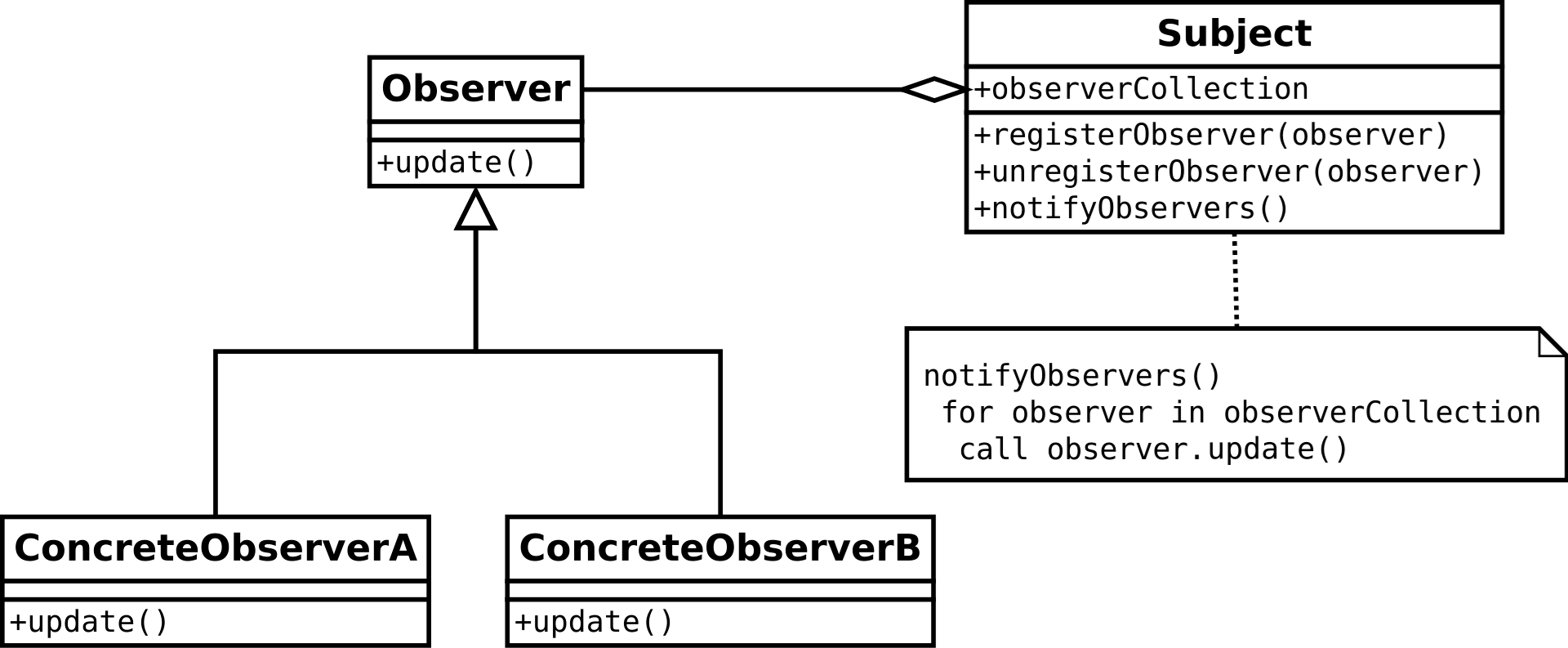
Player.cs:
1
2
3
4
5
6
7
8
9
10
11
12
13
14
15
16
17
18
19
20
21
22
23
24
25
26
27
28
29
30
31
32
33
34
35
36
37
38
39
40
// IObserver.cs
public interface IObserver
{
    void OnNotify();
}

// ISubject.cs
using System.Collections.Generic;

public interface ISubject
{
    void Register(IObserver observer);
    void Unregister(IObserver observer);
    void Notify();
}

// PlayerSubject.cs
using System.Collections.Generic;
using UnityEngine;

public class Player : MonoBehaviour, ISubject
{
    private readonly List<IObserver> observers = new();

    public void Register(IObserver observer) => observers.Add(observer);
    public void Unregister(IObserver observer) => observers.Remove(observer);


    public void TakeDamage(int dmg)
    {
        health -= dmg;
        if (health <= 0)
			Notify();
    }

    public void Notify()
    {
        foreach (var obs in observers) obs.OnNotify();
    }
}
RespawnManagerObserver.cs:
using UnityEngine;

public class RespawnManagerObserver : MonoBehaviour, IObserver<PlayerDiedEvent>
{
    [SerializeField] private ISubject playerSubject; // could be found at runtime or set by a bootstrapper
    [SerializeField] private GameObject playerPrefab;

    void OnEnable()
    {
        if (playerSubject != null) playerSubject.Register(this);
    }

    void OnDisable()
    {
        if (playerSubject != null) playerSubject.Unregister(this);
    }

    public void OnNotify()
    {
        Debug.Log("Observer received PlayerDiedEvent. Respawning...");
        Instantiate(playerPrefab, Vector3.zero, Quaternion.identity);
    }
}
Player is the “Subject” and the Respawn Manager is the “Observer”. At this point it’s already decoupled the Player and the Respawn Manager right?
Then what are the problems with this implementation?
- No parameters in Notify() — who killed the player? Where did it happen?
- Each subject/observer pair needs its own interface; this becomes repetitive.
- Subjects must expose registration methods and observers must register themselves — this wiring causes coupling.
- The subject (Player) is responsible for notification logic, which can violate SRP depending on your view.
I think the biggest problem here is the first one. Current implementation do not let us the parameters so firstly I will focus on solving that.
Parameterized Generic Observer
Using generics (IObserver<T>, ISubject<T>) we can solves parameter passing.
1
2
3
4
5
6
public interface IPlayerDeathSubject
{
    void Register(IPlayerDeathObserver observer);
    void Unregister(IPlayerDeathObserver observer);
    void Notify(GameObject instigator);
}
1
2
3
4
5
6
7
8
9
10
11
12
13
14
15
16
17
18
19
20
21
22
23
24
25
26
27
28
29
30
31
32
33
34
35
36
37
38
39
40
41
// IObserver.cs
public interface IObserver<T>
{
    void OnNotify(T data);
}

// ISubject.cs
using System.Collections.Generic;

public interface ISubject<T>
{
    void Register(IObserver<T> observer);
    void Unregister(IObserver<T> observer);
    void Notify(T data);
}

// PlayerSubject.cs
using System.Collections.Generic;
using UnityEngine;

public class PlayerSubject : MonoBehaviour, ISubject<PlayerDiedEvent>
{
    private readonly List<IObserver<PlayerDiedEvent>> observers = new();

    public void Register(IObserver<PlayerDiedEvent> observer) => observers.Add(observer);
    public void Unregister(IObserver<PlayerDiedEvent> observer) => observers.Remove(observer);

    private int health = 100;


    public void TakeDamage(int dmg)
    {
        health -= dmg;
        if (health <= 0) Notify(new PlayerDiedEvent { position = transform.position, player = gameObject });
    }

    public void Notify(PlayerDiedEvent data)
    {
        foreach (var obs in observers) obs.OnNotify(data);
    }
}
1
2
3
4
5
6
7
8
9
10
11
12
13
14
15
16
17
18
19
20
21
22
23
24
// RespawnManagerObserver.cs
using UnityEngine;

public class RespawnManagerObserver : MonoBehaviour, IObserver<PlayerDiedEvent>
{
    [SerializeField] private Player playerSubject; // Player looks like dependency but we just use it to find object itself. It could be done via bootstrap code as well.
    [SerializeField] private GameObject playerPrefab;

    void OnEnable()
    {
        if (playerSubject != null) playerSubject.Register(this);
    }

    void OnDisable()
    {
        if (playerSubject != null) playerSubject.Unregister(this);
    }

    public void OnNotify(PlayerDiedEvent data)
    {
        Debug.Log("Observer received PlayerDiedEvent. Respawning...");
        Instantiate(playerPrefab, Vector3.zero, Quaternion.identity);
    }
}
Feels better, to be honest for respawn manager it looks okey and we solved the parameter passing without repitition but for the Player class I feel a little irritated. Here are the problems that bugs me:
- Adding interfaces to player for each event can be messy really quick especially considering player might have lots of different events.
- It brokes the single responsibility of the
Playerclass. Well, that may depend on the specifics of your project. And I think what makes Unreal Engine’s designs are great they break those rules often to make something better. Still, at least we could separate the logic how it will be triggered and rather player just trigger the event. - Wiring subject and observer cause coupling. Currently a boostrap code can wire those two.
1
2
3
4
5
6
7
8
9
10
11
12
13
14
15
16
17
18
19
20
21
22
// Bootstrap class
public class GameBootstrap : MonoBehaviour
{
    [SerializeField] private GameObject playerPrefab;

    void Start()
    {
        // Spawn player
        GameObject playerObject = Instantiate(playerPrefab);
        Player player = playerObject.GetComponent<Player>();

        // Cast to ISubject
        ISubject<PlayerDead> playerSubject = player;

        // Find and cast RespawnManager
        RespawnManager respawnManager = FindObjectOfType<RespawnManager>();
        IObserver<PlayerDead> respawnObserver = respawnManager;

        // Register subject to observer
        playerSubject.RegisterObserver(respawnObserver);
    }
}
Again we are asking ourselves what is COMMON here!? All subjects needs to be wired its related observers. But we are writing new code for each wiring operation.
Let’s imagine real life radio towers. They broadcast signals without caring who receive it. I bet they do not wire cables from radio towers to your pocket phone.
Then how the signals find the correct device? They do NOT! But each signal has its own frequency, and signature messages. As a cyber sec entusiast I can tell that this is what we hackers do right? We listen those free signals on air.
Nature can inspire our design (well how much you can consider nature the 400 meter tall metal tower). Instead adding int hz field into our code we will define an event channel. However we have limitations, we do not have physical radio waves. Well maybe that’s the limiatation of real life.
Here we need to design a transmission system.
Out of the topic, but wouldn’t it be amazing if we would transmit messages in game engine with real physical waves!? Just imagine there are no manager class, just phsyical waves for class communications.
Well some ideas to design transmission system and channels: 1) Having a manager class in the game. All trasnmitted events will be catched by it and observers will subscribe to this one object. 2) Events can be declared as data assets (or ScriptableObjects in Unity).
As a Unity dev I seen that second option with ScriptableObjects choosen for many indie projects. So if I would go with Unity Scriptable Objects, I would end up with something like that:
1
2
3
4
5
6
7
8
9
10
11
12
13
14
15
16
17
18
19
20
[System.Serializable]
public class PlayerDeathPayload
{
    public GameObject Instigator;
    public GameObject Victim;
    public Vector3 Position;
}

public abstract class EventChannel<T> : ScriptableObject
{
    public event Action<T> OnRaised;

    public void Raise(T payload) => OnRaised?.Invoke(payload);

    public void Register(Action<T> listener) => OnRaised += listener;
    public void Unregister(Action<T> listener) => OnRaised -= listener;
}

[CreateAssetMenu(menuName = "Events/PlayerDeath")]
public class PlayerDeathEvent : EventChannel<PlayerDeathPayload> {}
Design of the Lyra’s Game Message Subsystem
At this point we build fairly good event system. Now we will transition to analyzing actual code of the Lyra’s Game Message Subystem and see what we can improve in our design.
Monster Methods and Data
Our last implementation looked solid — using ScriptableObjects or an event bus is a reasonable pattern for many projects. But one annoyance remained: for every new event we still needed a new payload type (e.g., PlayerDeathPayload). That leads to a lot of tiny structs and repitition.
Lyra takes a different approach: instead of many tiny payloads, it uses a single, flexible message struct that can carry different kinds of information. In other words — a “monster” payload that works under many circumstances.
1
2
3
4
5
6
7
8
9
10
[System.Serializable]
public class EventVerbPayload
{
    public GameObject Instigator;
    public GameObject Target;
	public String[] Tags;
	public float Magnitude = 1.0f;

	// This not look like a monster but make the job done :)
}
What we do here, generalizing the event payload. Looks simple but this setup we can handle various game events. Yes we lost the data of where the player death, but still we can use Target GameObject’s position data to find player’s position.
Philosophy learned here, some cases monster methods and data with many configurations better than a minimal one.
Lyra’s actual message struct is the same idea — generic, flexible, and rich enough for most gameplay messaging:
1
2
3
4
5
6
7
8
9
10
11
12
13
14
15
16
17
18
19
20
21
22
23
24
25
26
27
28
29
30
// Represents a generic message of the form Instigator Verb Target (in Context, with Magnitude)
USTRUCT(BlueprintType)
struct FLyraVerbMessage
{
	GENERATED_BODY()

	UPROPERTY(BlueprintReadWrite, Category=Gameplay)
	FGameplayTag Verb;

	UPROPERTY(BlueprintReadWrite, Category=Gameplay)
	TObjectPtr<UObject> Instigator = nullptr;

	UPROPERTY(BlueprintReadWrite, Category=Gameplay)
	TObjectPtr<UObject> Target = nullptr;

	UPROPERTY(BlueprintReadWrite, Category=Gameplay)
	FGameplayTagContainer InstigatorTags;

	UPROPERTY(BlueprintReadWrite, Category=Gameplay)
	FGameplayTagContainer TargetTags;

	UPROPERTY(BlueprintReadWrite, Category=Gameplay)
	FGameplayTagContainer ContextTags;

	UPROPERTY(BlueprintReadWrite, Category=Gameplay)
	double Magnitude = 1.0;

	// Returns a debug string representation of this message
	LYRAGAME_API FString ToString() const;
};
Why a subsystem (manager)?
Now that we have a working event model, let’s examine the subsystem-level choices Lyra makes and why they matter.
Lyra centralizes messaging in a persistent manager — a UGameplayMessageSubsystem. Managers get a bad rap because they can become god-objects, but they make sense here because:
Clear responsibility: The subsystem’s single job is message routing and listener management. It doesn’t mix in AI, physics, or UI logic.
World lifecycle alignment: The subsystem lives at the right scope (game/world), so listeners and broadcasts behave predictably across map loads and game modes.
Performance & memory: A single routing point can be optimized internally (caching listeners, batching, etc.) in ways ad-hoc wiring can’t.
Philoshpy here, manager classes fits very naturally for some problems, and using them actually nice. But each manager must have clear lifecycle and only has single responsibility.
Ergonomics: handles, tags and utilities
Lyra invests in developer ergonomics. A couple of conveniences stand out:
Listener handles: When you register a listener you get a handle back. Use it to unregister cleanly later — much nicer than juggling raw delegates or pointers.
1
PlayerDeathMessageListenerHandle = UGameplayMessageSubsystem::Get(GetWorld()).RegisterListener<FHarvestMessageVerb>(...)
Tag-based channels: Instead of hardcoding different event types, Lyra uses FGameplayTag to identify message “verbs” or channels (e.g., Game.Player.Die). Tags let listeners filter by semantic meaning, not by concrete types.
1
2
3
4
5
6
7
8
9
10
11
	// Send a standardized verb message that other systems can observe
		{
			FLyraVerbMessage Message;
			Message.Verb = TAG_Lyra_Elimination_Message; // Tag data (Game.Player.Die)

			<...SNIP...>

			UGameplayMessageSubsystem& MessageSystem = UGameplayMessageSubsystem::Get(GetWorld());

			MessageSystem.BroadcastMessage(Message.Verb, Message);
		}
Philosophy: Add utilities to acquire great interfaces.
Closing
Lyra’s Gameplay Message Subsystem is a pragmatic mix of realistic engineering trade-offs: centralized routing for clarity and lifecycle control, expressive messages to reduce boilerplate, and small UX improvements to make the system pleasant to use. For my own project (Tarnish), I’ve already found this pattern helpful — it allowed the player code to remain focused while letting game-mode variations react differently to the same events.